You planned the service. You built the schedule. Then it hit the street, and the street didn't follow the plan. A driver called out. A detour closed the road ahead. And by the time anyone could act on it, the moment had passed. Demand-response transit has already learned to adapt as it happens. Fixed route hasn't kept pace. That's changing.
At our October Product Showcase, we debuted Via Fixed Route, an end-to-end solution that runs from the first route you draw to the arrival time a rider sees. We also showed Live Ops tools for faster investigations by dispatch, and updates across our operations suite that put key numbers in front of your team right in the moment they need them.
Jump in and check it out!
- Fixed Route: Plan, schedule, and operate in one place
- Live Ops: Investigate issues with richer context
- Via Operations Center Homepage: Start your day with the numbers that matter
- Global Search: Find riders, drivers, caregivers and rides in seconds
- Rider Insights: Manage no-shows and suspensions with confidence
Via Fixed Route: Plan, schedule, and operate in one place.
.png?width=835&height=444&name=image%20(29).png)
Via Fixed Route brings planning, scheduling, operations, and rider communications into one platform. Because it's one system, what happens on the road flows back into planning, so agencies can see how service really performs and improve it.
Here's how it works:
-
Plan. Draw routes in Remix, from one route to 200, and generate the maps and timetables riders need.
-
Schedule. One-click optimization builds efficient blocks and runs around your labor rules, cutting deadheads, idle time, and fleet needs. Publish straight to the Via Operations Center, with no handoff between systems.
-
Operate. The Via Operations Center predicts early and late trips and flags issues like offline vehicles. If a driver calls out sick, move or copy trips to a new shift, driver, and vehicle in a few clicks, and the new driver sees it in their app.
-
Drive. One Via Driver app covers fixed route and demand response, with guidance, timing, and special instructions like "hold 30 seconds at this stop." A built-in passenger counter is available for agencies without automated counters.
-
Inform. Riders get accurate arrival predictions in the Via Rider app, a white-labeled web app, or Citymapper, and can plan multimodal trips.
-
Improve. On-time performance and real-world behavior flow back into Remix, so you can see which routes, stops, and times of day need attention.
The result: one connected system, with fixed route and demand response managed side by side.
Live Ops: Investigate issues with richer context.
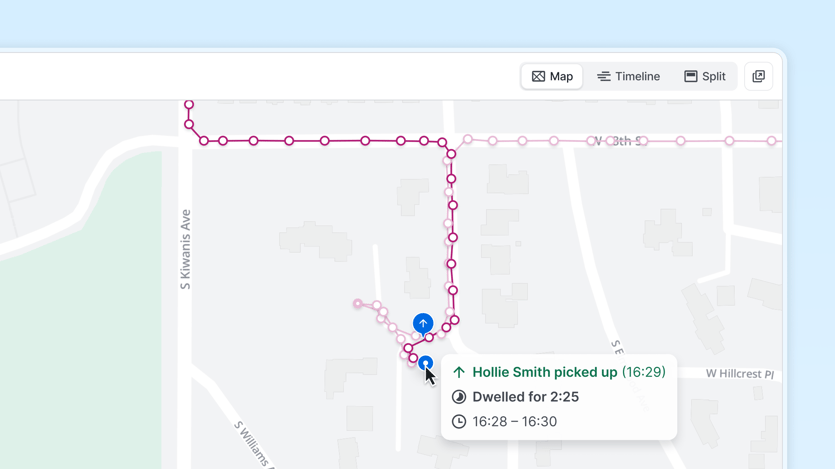
A rider calls: "Where's my ride?" The answer is rarely just a late vehicle. It might be a driver circling the block, a rider waiting a short walk from the pin, or a trip that drifted outside the service area. New Live Ops tools give dispatchers a real-time view across modes, plus the context to see what actually happened, so they can solve problems while the rider is still on the line.
- Map layers. Show service areas, zones, and special locations like campuses and hospitals.
- Vehicle labels. When a rider calls, find a vehicle by ID, license plate, shift, or driver name.
- Ride History. See pickup and drop-off points, GPS breadcrumbs, dwell times, and speed for past or live rides. It shows when a driver circled the block looking for a rider, or when a trip left the service area.
The result: faster problem solving, with less guesswork for dispatch.
Via Operations Center Homepage: Start your day with the numbers that matter.
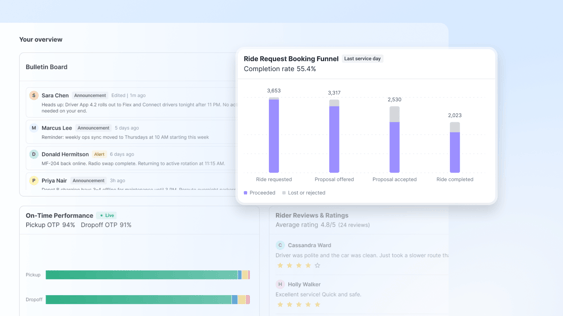
The first thing your team does each morning is log in to the Via Operations Center. We're revamping the homepage so the key information is there at a glance, and ready to act on.
- Top-line KPIs. A KPI bar shows the metrics teams check daily, like completed rides and net vehicle hours. Compare against the previous day or week, and segment by sub-service if you run more than one. Numbers refresh every minute.
- Widgets. Think of them as supercharged charts. A booking funnel follows ride requests through proposals offered, proposals accepted, and rides completed, and shows where and why rides drop off, such as cancellations or no-shows. An on-time performance widget carries a live tag so you know it's updating in real time. A rider reviews and ratings widget builds on the Rider Experience Dashboard, so you can spot five-star service and generate a certificate to recognize the driver.
- Make it yours. Drag and drop to reorder widgets, and remove the ones you don't need. As we add more, you can tailor your view in the same place.
- Team announcements. Post an update your whole staff sees when they log in, like adjusted holiday hours.
- Via announcements. A new announcements feed gives advance notice of new features and key alerts, with links to Help Center articles, so you're never surprised.
The result: less digging, and more time focused on your service.
Global Search: Find riders and rides in seconds.
Operational data doesn’t have to live in spreadsheets. New dashboards help teams turn information into action.
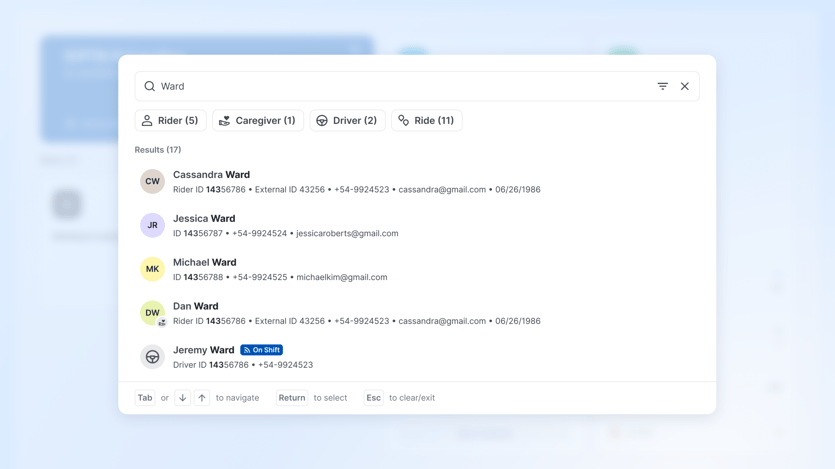
When a call center reservationist is on the phone with a rider, seconds matter. We're rebuilding Via Operations Center search to be as fast as possible.
- Pick up where you left off. Recent results appear as soon as you open search, so you can jump back to the rider you were just helping.
- Search across everything. Results span riders, drivers, and rides by default, with key details like rider ID, phone number, and email right in the results.
- Forgiving by design. Search finds close matches for misspellings, and you don't need to remember an exact phone number format.
- Status at a glance. Results show whether a rider is active or suspended.
- Straight into investigations. Search for a ride by ID, see its status, and click through to the ride plan and its history to start an investigation.
The result: less time searching, more time helping riders.
Rider Insights: Manage no-shows and suspensions with confidence.
Operational data doesn’t have to live in spreadsheets. New dashboards help teams turn information into action.
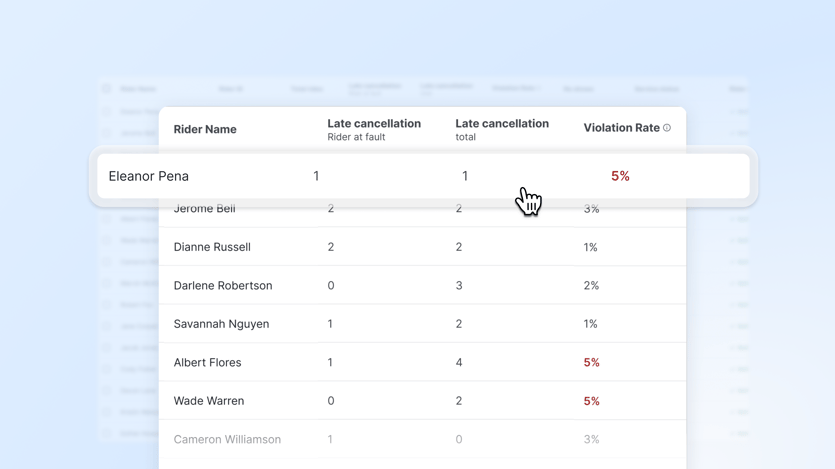
One rider keeps missing pickups. Another keeps canceling at the last minute. Suspensions help keep service reliable and fair, but applying your policy consistently starts with knowing who is actually at risk. The new riders page brings no-shows, late cancels, and violation rates into one view, so your team can warn or suspend with the numbers in front of them.
- See the numbers. For each rider: total rides, no-shows, late cancels, and violation rate (no-shows plus late cancels, divided by total ride requests). The defaults are the last 30 days and a 2-hour late-cancel window, and you can adjust both.
- Narrow the list. Filter by minimum no-shows, late cancels, or violation rate to find riders at risk of a suspension.
- Schedule a suspension. Set start and end dates and send the letter now. The rider keeps riding until the suspension begins.
- Generate letters. Choose warning, temporary suspension, or permanent suspension templates with editable dynamic fields, then download to print and mail. Available from the riders page and each rider's page.
Coming soon: bulk letters, waiving or forgiving a no-show or late cancel, and easier email delivery.
The result: clearer information, and a fair, consistent process.
What's next.
From planning and scheduling to live operations and the moment your team logs in, these updates bring us closer to a connected transit network, one where planning informs operations, operations improve planning, and data powers every decision in between.
And we're just getting started! 📩 Stay tuned for future showcase webinars by signing up for our newsletter.


