At our October Product Showcase, we shared how Remix is putting more control in your hands: a rebuilt way to draw routes, flexible day types, smarter rostering, and fixed route operations that close the loop between plan and street.
Jump in and check it out!
- Drawing 2.0: Draw routes with precision, and see every change
- Flexible Day Types: Build your service once, not three times
- Self-Serve User Management: Add and manage users yourself
- Rostering: Tell the algorithm exactly which rosters you want
- Fixed Route Operations: Connect planning, scheduling, and live service
Drawing 2.0: Draw exactly the route you intend.
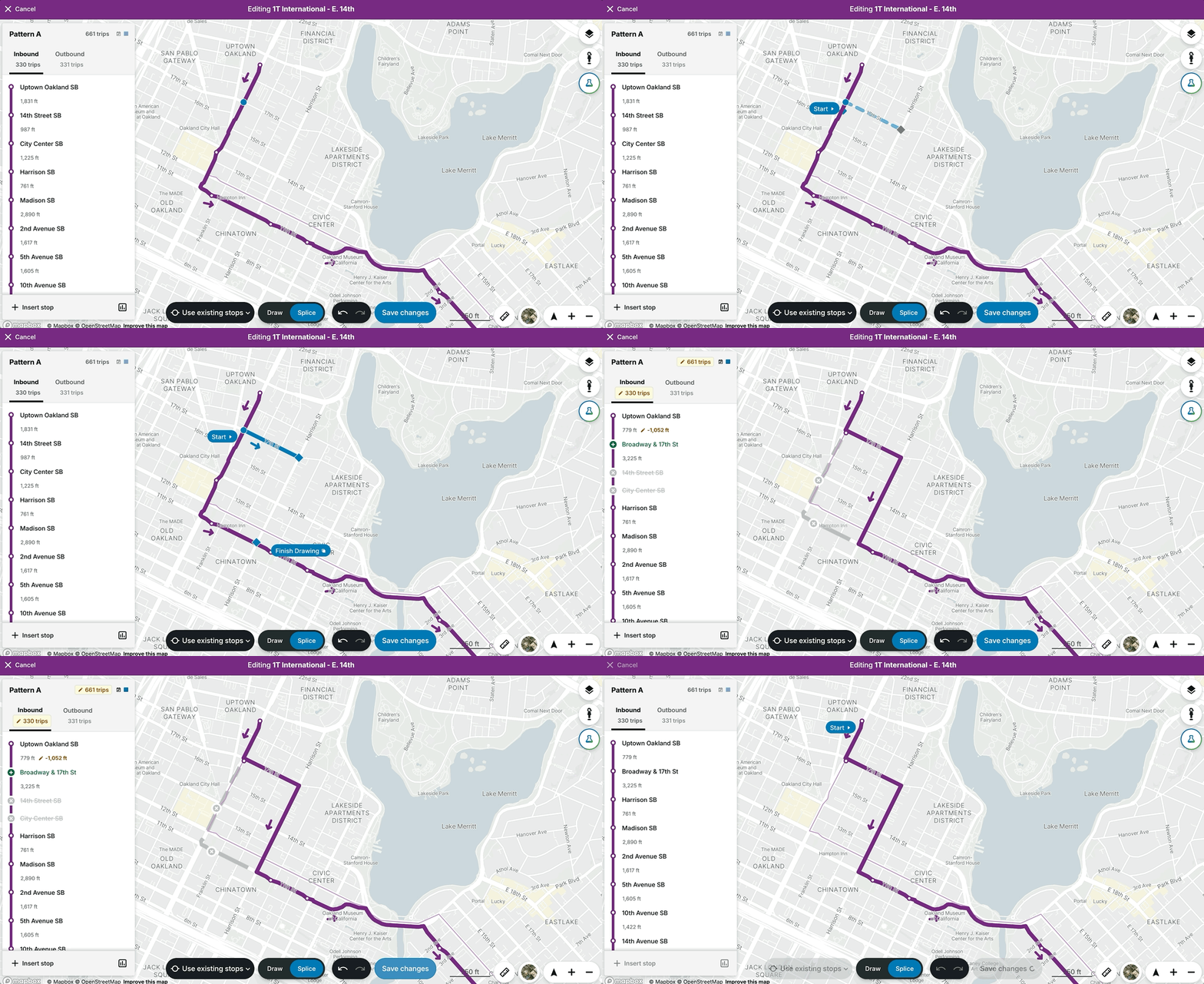
Drawing is the heart of Remix. Customers told us they wanted it to be even more flexible, more precise, and clearer about what each change does. Meet Drawing 2.0:
- See every change. Edits appear against your original route, with disabled and newly enabled stops marked and the number of trips affected.
- Control your stops. Choose whether Remix auto-enables stops when you reroute. Add stops from the map or by searching stop ID or name, or insert one between two stops and Remix generates the routing.
- Splice Mode. Pick a start point, draw the new path, and rejoin the route. Remix does the cutting, so there's no more dragging anchors. (Splice Mode is a working name, so send us your suggestions.)
- Lock your timetables. Change a route's geometry or stops while keeping every stop time exactly as it was.
- Loop routes, solved. On a route that doubles back, choose which pass-through to edit.
- Edit with confidence. Discard resets a route, nothing sticks until you save, and you can edit a specific service period, like a winter pattern.
The result: more precision, fewer surprises, and confidence in every change.
Flexible Day Types: Build your service once.
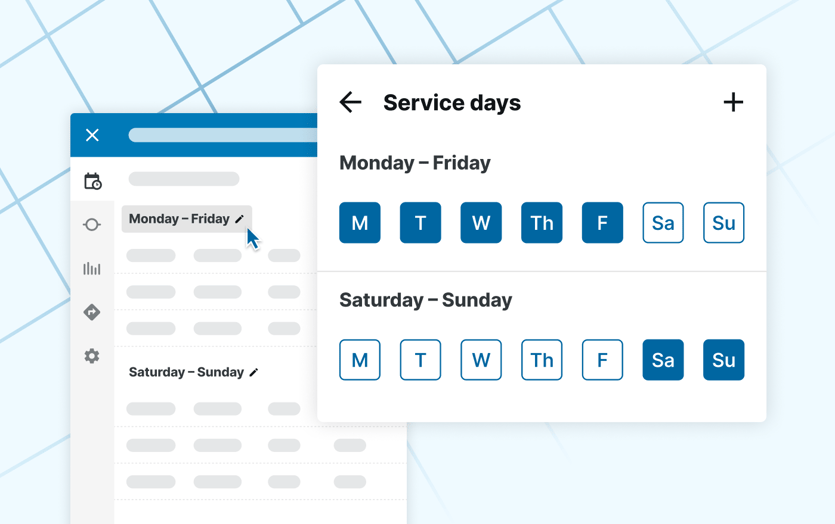
Until now, if your weekday service matched your Saturday service, you made every edit twice and rebuilt the same blocks in scheduling. It's one of our longest-standing requests, and now you can decide how your days of service are organized.
- Define your own day types. Make Sunday run like Saturday, or use one Monday through Sunday day type with some trips marked Monday through Friday only. Set a default like Monday through Sunday for new lines.
- Schedule once. One set of trips means one set of blocks.
- Cleaner GTFS. A Monday through Sunday service exports as one service ID, and GTFS imports with Calendaring bring in your day types automatically.
- Editable trip IDs. View and edit trip IDs in the timetable, using Remix-generated IDs or the ones from your GTFS, like your CAD/AVL system's.
The result: less duplicate work, and cleaner data from planning through scheduling.
Self-Serve User Management: Add your team in a few clicks.
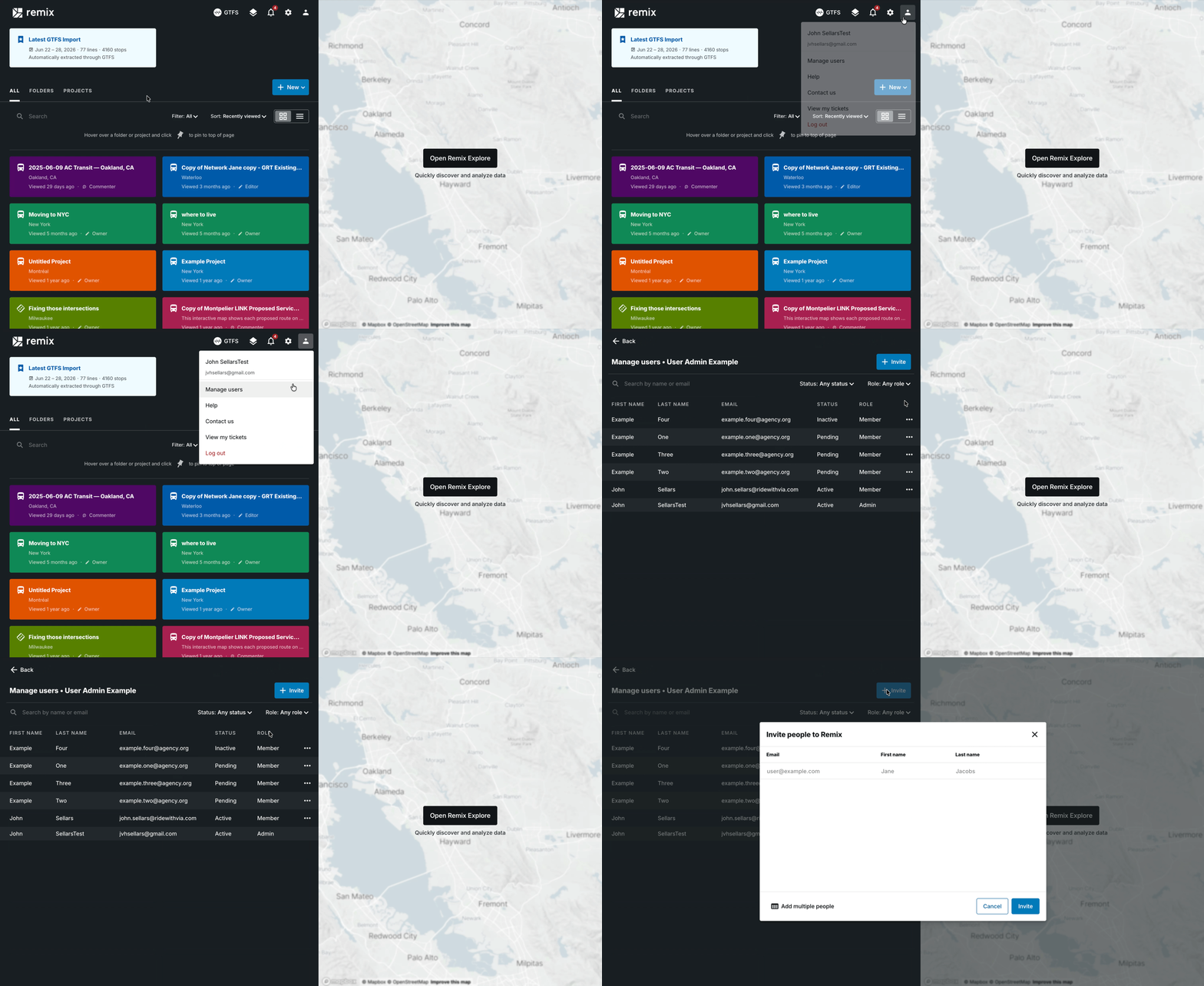
Agencies have asked for years to add users themselves. Now org admins can.
- Manage Users to see your team by active, inactive, or pending status.
- Invite, resend, or deactivate users in a few clicks.
- Name as many admins as you like. Use Contact Us in Remix to tell us who.
The result: less waiting, and more control for your team.
Rostering: Tell the algorithm exactly what you want.
.png?width=835&height=458&name=image%20(31).png)
Rostering now starts with what you want. With the new roster composition flow, you describe the rosters you're after, like 4x10s and 5x8s in the same run, and the algorithm builds to them.
- Define roster types. Set days worked, weekly hours, run lengths, overtime rules, guaranteed paid hours, rest between shifts, and which run types qualify, like straight runs only. Copy and name types, like 4x10 AM and 4x10 PM.
- Ask for exact counts. As many 5x8 rosters as possible and exactly ten 4x10s? Say so. Requirements are hard rules, so a roster only counts if every run meets them.
- See the impact right away. Change a rule and see which rosters no longer qualify. Rosters that match no type are flagged, and you can label them or add a type, like part-time.
- Plan your counts. See run counts by run type and day of the week before you generate.
The result: rosters that match the workweeks you asked for, with less manual cleanup.
Fixed Route Operations: Close the loop from plan to street.
Many of you already plan and schedule fixed route service in Remix. Now Remix and Via are bringing operations into the same workflow: one end-to-end solution from the first line you draw to the bus on the street.
- Plan and schedule in Remix.
- Take your changes live in Via.
- Keep service on track. Dispatch sees vehicles, routes, and zones in real time and can step in when disruptions happen.
- Plan from what really happened. Live data flows back into Remix, so your next plan reflects the road.
- Keep everyone aligned. Driver and rider apps share timeliness and disruption info.
The result: plans that learn from live service, in one connected system.
What's next?
These new features are live—or coming soon—and we can’t wait to see how you use them. As always, we build Remix with your feedback, so let us know what you want to see next.
📩 Want to be the first to know about new features? Stay tuned for future showcase webinars by signing up for our newsletter.


